Lines
Objects / Other / Lines (24 June, 2026)
|
Note This object hasn't been updated since version R1.0.1_10.05.25! TODO: Update and fix |
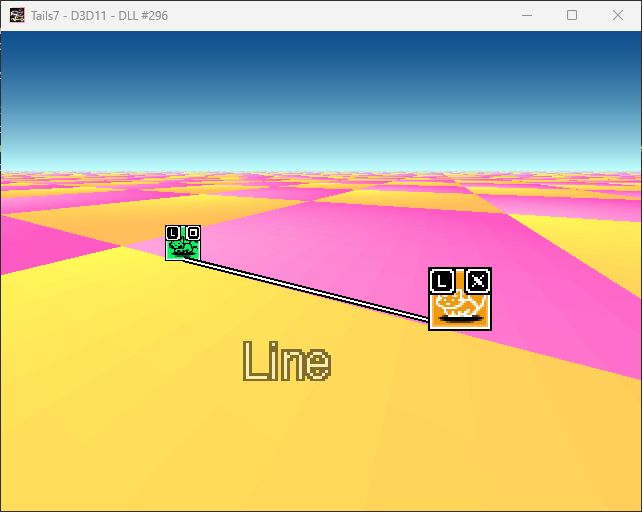
Line objects are defined as those objects that have a start and end point, and a 2D line is drawn on the screen through these points.
These objects mainly use 2 separate Sprite objects for points A and B.
Each point has its order, starting from point A to point B.
The object also has four behaviors: Set Points and Other Variables, Set Position, Rotation & Scale, Set Visibility, and Set Texture.
- The first behavior retrieves the position of points A and B as well as their visibility.
- The second behavior uses the obtained values to set the object on the screen, sets its scale where it should start and end, and calculates the angle at which the line should be drawn.
- The third behavior sets the visibility of the line, and the fourth sets the line's texture to 1 (You can modify this if you want the line to change texture).
Alterable Values
|
Variable index |
Variable name |
Description |
Default value |
Required version |
|
1 / B |
_PointX_A |
Variable that stores the X value of point A in the line. |
(Automatically) |
R1.0.1_10.05.25 |
|
2 / C |
_PointY_A |
Variable that stores the Y value of point A in the line. |
||
|
3 / D |
_PointX_B |
Variable that stores the X value of point B in the line. |
||
|
4 / E |
_PointY_B |
Variable that stores the Y value of point B in the line. |
||
|
0 / A |
_Thickness |
The variable that defines the thickness of the line drawn on the screen. |
2.0 |
|
|
5 / F |
_TextureSizeX |
Declare here the size of the line texture you are using on the X-axis. |
1 |
|
|
20 / U |
_LayerOffset |
Similar to Sprite, it shifts the object in layers; a positive value means the object will be above other objects, a negative value means the opposite. |
0 |
|
|
19 / T |
_Layer |
Variable that stores which layer the polygon object is on; by default it is the average of points A and B. |
(Automatically) |
Flags
|
Variable index |
Variable name |
Description |
Default value |
Required version |
|
1 / B |
_Visibility_A |
This variable determines whether point A is visible. |
(Automatically) |
R1.0.1_10.05.25 |
|
2 / C |
_Visibility_B |
This variable determines whether point B is visible. |
||
|
5 / F |
_IgnoreShowing |
This variable determines whether the polygon should ignore the visibility settings of points A, B and be always invisible or when needed. |
False |
|
|
4 / E |
_QualityScale |
This variable determines whether the line should be drawn in a higher quality at the expense of performance. Setting it to False uses Nearest Neighbor filtering (pixelated), and setting it to True uses anti-aliasing filtering. |
Created with the Personal Edition of HelpNDoc: Free help authoring environment