Shader parameters
Objects / Tails7 Objects / Render Ground / Shader parameters (23 June, 2026)
Tails7 requires the "Mode 7 (Switch)" effect, which can be found here.
Version R1.0.3 requires version 2.0 (from March 21, 2026);
Version R1.0.2 requires version 1.9 (from November 8, 2025);
Using the wrong version may cause graphical artifacts.
Variables from the "Position" category:
- _PosX
- _PosY
- _PosZ
These define the camera's position along the X, Y, and Z axes in space.
For X and Y, the scale ranges from 0.0 to 1.0 to move from the beginning to the end of the texture.
The Z value only determines the texture's scale; X and Y must also be adjusted, but Tails7 handles this automatically depending on the Position Mode in Camera Object.
Variables from the "Rotation" category:
- _RotX
- _RotY
- _RotZ
These variables control the camera's orientation.
For X-axis rotates the camera around its own axis (pitch).
For Y-axis rotates the camera around the center of the scene (yaw).
For Z-axis controls the vertical viewing angle.
Since this engine uses Mode 7 instead of true 3D, the _RotZ variable does not cause an actual rotation.
Instead, it shifts the entire rendered view along the Y-axis, creating the illusion of looking up or down.
This technique is commonly known as "Y-shearing" and was used in the classic Doom to simulate a vertical view without actually rotating the camera in 3D.
Variables from the "Points Position" category:
- _RotXPointX
- _RotXPointY
- _RotYPonitX
- _RotYPointY
These variables determines offset point position in the for Rotation X and Y-axis.
Variables from the "Camera Extra Options" category:
- _OffsetX
- _Distortion
Offset X works similarly to _RotZ, but it does not apply to the Y-axis-only to the X-axis.
Distortion determines the degree of perspective curvature; the recommended range is from 0.0 to 1.0.
A value of 0.0 corresponds to a top-down view in a 2D plane; as the value approaches 1.0, the degree of curvature increases until it reaches 1.0, at which point full perspective is achieved.
Variables from the "Texture" category:
- _Scale
- _ScaleX
- _ScaleY
- _PosOffsetX
- _PosOffsetY
These variables control the texture scaling.
Scale multiplies the scale for both the X and Y axes;
Scale X multiplies the scale only for the X axis;
Scale Y multiplies the scale only for the Y axis;
However, to change the texture's position offset without changing the camera's position or the rest of the environment, use Position Offset X for the X axis and Position Offset Y for the Y axis.
Variables from the "Rendering Options" category:
- _Looping_Mode
- _Render_Sky
- _Blending_Mode
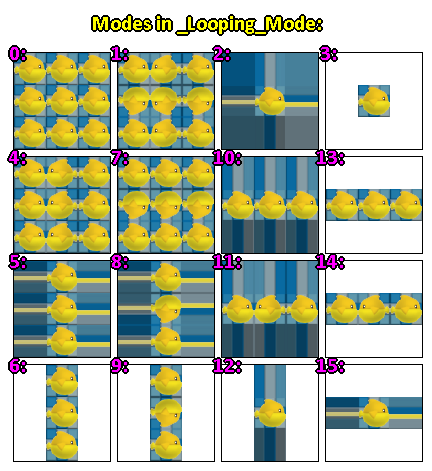
Looping Mode, as the name suggests, specifies which mode should be used to loop the texture;
For Direct3D 9, only modes 0 through 3 are available;
For Direct3D 11 and OpenGL/ES, modes 0 through 15 are available.
List of modes for separately (X, Y) by _Looping_Mode:
0: (REPEAT, REPEAT);
1: (MIRRORED, MIRRORED);
2: (CLAMP, CLAMP);
3: (BORDER, BORDER);
4: (MIRRORED, REPEAT);
5: (CLAMP, REPEAT);
6: (BORDER, REPEAT);
7: (REPEAT, MIRRORED);
8: (CLAMP, MIRRORED);
9: (BORDER, MIRRORED);
10: (REPEAT, CLAMP);
11: (MIRRORED, CLAMP);
12: (BORDER, CLAMP);
13: (REPEAT, BORDER);
14: (MIRRORED, BORDER);
15: (CLAMP, BORDER)
Render Sky determines whether to render the duplicated background layer as a ceiling, but the problem is that the X and Y positions are reversed;
TODO: to be fixed
Blending Mode determines whether to use the background texture (behind the object) or the object's texture
Variables from the "Compatibility" category:
- _Is_Pre_296_Build
Why would you use an older version of Fusion?
Created with the Personal Edition of HelpNDoc: Elevate Your CHM Help Files with HelpNDoc's Advanced Customization Options